

Understand the objective
Checkers turns diagonal movement into a contest of timing. Twelve men each share an 8 × 8 board, but only the dark squares are used. On this platform, forward captures and the huffing rule make it important to inspect every available capture before choosing a move.
How to play
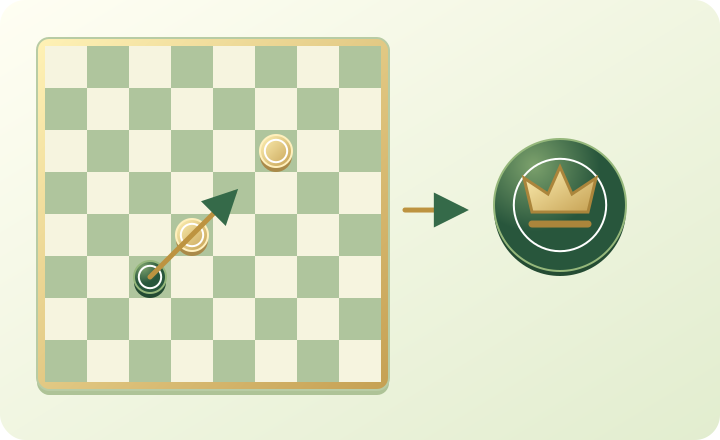
Light moves first. Select a man and move one empty square diagonally forward. To capture, jump over an adjacent opposing piece to the empty square beyond it. Ordinary men cannot capture backwards here. A highlighted destination helps you see the allowed move. Reaching the opposite back rank at the end of a move crowns your piece; a king then travels along free diagonals and can capture in either direction.
Rules used on this platform
- 8 × 8 board, 12 pieces each. Light starts. Platform variant with huffing.
- Men move and capture diagonally forward only. Before the first jump you may move any piece, with or without capturing. If you skip the longest available capture route, a piece offering that route is huffed: the moved piece first if tied, otherwise board order.
- Crowned kings travel along any clear diagonal and jump one opponent to a free square beyond it. Complete all captures with the same piece.
- Captured pieces block paths until the whole sequence ends. Promotion depends on the final square.
- Win by capturing or blocking all opposing pieces. Simplified platform draw: 80 king moves without capture.
Build a simple plan
Before moving, compare all capture sequences, not only the nearest jump. You may choose another piece before the first capture, but declining the longest capture can cost a piece through huffing. Once a capture sequence begins, finish it with the same piece. Keep neighbours supporting each other and try to reach promotion with protection rather than rushing a lone man.
Mistakes to avoid
Do not assume this is international 10 × 10 draughts: the board, backward-capture rule and huffing differ. A crown does not exempt a piece from huffing. Captured pieces remain obstacles until the sequence ends. Count the landing squares after each jump; a tempting first capture may lead your piece into an exposed position.
Try this exercise
Before each of your next six turns, identify the piece offering the longest capture and count the jumps. Then choose whether to take it or accept the huffing consequence. After a game, find one position where waiting or defending was stronger than advancing.
Play with your own profile
Open the profile button at the top of a game and choose Create account. Pick an available nickname of 2–20 letters or numbers, with spaces, dots or hyphens. Enter a private password of 10–128 characters and confirm it. Sign in on another device with the same credentials to recover your saved profile and coins. Never send your password in chat.
To try the platform without a password, choose Continue as guest and enter your name before joining. A registered account reserves its nickname: the profile editor does not currently rename it. You can choose a name when creating an account or upgrading a guest account. Check spelling before confirming; changing your sticker or flag does not rename your account.
Open your profile, browse the circular stickers and select the face that suits you. The list scrolls inside the window. Choose a country flag, or the globe option for no flag, then save. Your selected sticker appears beside your name in games and chat; in Parchisi and Monopoly it also represents your moving pawn. Signed-in profile choices are saved to your account.
The chat icon opens the conversation without leaving the game. Each message identifies its sender by nickname and sticker. The microphone button controls what you transmit; the listening button independently mutes or restores other players. A friend can hear you without opening their own microphone, provided listening is enabled. Allow microphone access when asked. Focus mode enlarges the board; closing the chat returns you to it.
Account & stickersChallenge a friend
Open the game you want to play and use Invite or the share icon. For Parchisi or Monopoly, select the number of seats and Friends first. Send the invitation, copy it or let your friend scan its QR code. Your friend enters with a separate profile. The invitation has a ten-minute countdown; if it expires, return home and create a new one. Use the start or fill option where the waiting room offers it.
Organise a tournament
From Tournaments on the homepage, create a cup, choose the game and select 4, 8 or 16 entrants. Choose an open event for random participation, or Friends to share invitations. The organiser controls the friend cup start. Empty places may be filled by platform-controlled opponents; a displayed profile does not establish that a person is online. Read the waiting-room countdown and entry settings before starting.
The current format is knockout with a bronze match. Follow the match cards to see the two opponents and who qualifies. Tournament matches are head-to-head, including the multiplayer games; a four-player Parchisi room is different from a four-entrant tournament. Each decision has a 120-second clock. A drawn match is replayed with reversed sides; after two draws the original seeded order decides qualification.
The final podium awards 100k platform coins for first, 50k for second and 10k for third. These coins track progression; they are not cash prizes. Monopoly money belongs only to the current board and is separate from your account coins. Keep the tournament page open between rounds, review the next match card and wait for the server’s result before leaving.
Organise a tournamentCommon questions
Can I invite a friend?
Open the game you want to play and use Invite or the share icon. For Parchisi or Monopoly, select the number of seats and Friends first. Send the invitation, copy it or let your friend scan its QR code. Your friend enters with a separate profile. The invitation has a ten-minute countdown; if it expires, return home and create a new one. Use the start or fill option where the waiting room offers it.
Can I change my account name?
To try the platform without a password, choose Continue as guest and enter your name before joining. A registered account reserves its nickname: the profile editor does not currently rename it. You can choose a name when creating an account or upgrading a guest account. Check spelling before confirming; changing your sticker or flag does not rename your account.
Are platform coins real money?
The final podium awards 100k platform coins for first, 50k for second and 10k for third. These coins track progression; they are not cash prizes. Monopoly money belongs only to the current board and is separate from your account coins. Keep the tournament page open between rounds, review the next match card and wait for the server’s result before leaving.